
A quick note about links: Some links in this guide are affiliate links, which means I may earn a small commission if you purchase through them, at no additional cost to you. I only share products that I use myself and that genuinely fit the guidance here. As an Amazon Associate, I earn from qualifying purchases.
Everybody Else Seems to Know What They’re Doing
You decide you want to go hiking. That sounds simple enough. You don’t need to climb a mountain or disappear into the wilderness for three days. You just want to find a beautiful trail, spend a few hours outside, and come home.
Then you start looking.
Suddenly you’re reading descriptions filled with words and numbers that seem to assume you already know what they mean. 4.3 miles. 620 feet of elevation gain. Loop. Moderate. Trailhead. Seasonal access. Is 620 feet a lot? Does 4.3 miles mean the whole hike or just the distance to wherever you’re going? What makes a trail moderate? Where exactly is the trailhead, and is that the same place as the parking lot?
You find a trail that looks promising, but now there are maps, route lines, junctions, contour lines, trail numbers and symbols you don’t recognize. You type the name into your navigation app and realize the park itself is enormous. The reviews are full of people casually discussing things like blazes and switchbacks as though everyone learned this vocabulary in third grade.
It can create a strange kind of hesitation. You wanted to go for a walk in the woods. Now it feels as though there was an orientation meeting everyone else attended and somehow you missed it.
There wasn’t.
There are simply a handful of things people learn after they’ve done this a few times: where to look for trails, which information matters, what the common terms mean, how to find the actual place you’re supposed to drive, and what to look for once you arrive. None of it requires you to become an expert before you leave home. You just need someone to explain the pieces that experienced hikers have stopped noticing they know.
That’s what we’re going to do here. We’ll start with “I want to go hiking” and work our way, one step at a time, to standing at the correct trailhead knowing where you are, what you’re looking at, and where your walk begins.

In This Guide
CHOOSE A TRAIL
What Kind of Day Do You Want? · The Six Basic Filters · Where to Look for Trails
UNDERSTAND WHAT YOU’RE LOOKING AT
How to Read a Trail Listing · Distance · Elevation Gain · Difficulty · Route Type · Terrain · Trail Conditions & Reviews
FIGURE OUT HOW TO GET THERE
Park vs. Trail vs. Trailhead vs. Parking · Driving to the Trailhead · Parking · Before You Leave Home
WHEN YOU ARRIVE
You Arrived. Now What? · Learn to Read a Basic Map · Cedar Lake Loop Map
ON THE TRAIL
Signs, Markers & Junctions · Find Your Way Back · What If It Doesn’t Feel Right?
TAKE IT WITH YOU
Your First-Trail Checklist
Before You Search, Decide What You’re Looking For
Before you open a trail-finding service and confront a seemingly endless list of possibilities, it helps to know what you’re actually looking for. You don’t need to plan the entire outing yet, and you don’t need exact answers. You’re simply giving yourself a few filters so you can turn hundreds of possible trails into a much smaller group that might actually suit you.
How far do I want to walk?
Start with a distance that feels reasonable for the body and experience you have today. If your usual walks are around two miles, your first hike doesn’t need to be eight. Hiking can involve uneven ground, roots, rocks, hills and slower movement than walking on a familiar sidewalk, so distance alone doesn’t tell you exactly how an outing will feel. For now, you simply need a general range you’re comfortable considering.
How much climbing am I comfortable with?
Two trails can be the same distance and feel completely different because one is relatively flat while the other spends much of that distance climbing. Later, we’ll unpack elevation gain and show you how to use that number when reading a trail listing. At this stage, you only need to decide whether you’re looking for something fairly gentle, whether some hills sound good, or whether you’re intentionally looking for more of a climb.
What kind of experience do I want?
This is where choosing a trail becomes more interesting than choosing a workout. Maybe you want to walk through deep woods, reach a lake, follow a creek, see a waterfall, find wildflowers, catch fall color or end at a viewpoint. Knowing what sounds appealing gives you another useful way to narrow the possibilities. You’re not simply asking, “Where can I exercise?” You’re asking, “Where would I like to go?”
How far am I willing to drive?
Decide what makes sense for this particular outing. That might mean staying within twenty minutes of home, or you may be perfectly happy driving an hour for somewhere you’ve been wanting to see. There is no prize for going farther. Setting a realistic radius simply prevents you from falling in love with a trail that turns a two-hour outing into an all-day commitment you didn’t intend to make.
Who is coming with me?
If you’re hiking with other people, choose the trail for the group you’re actually bringing—not just for yourself. Experience, comfort with uneven terrain, current fitness and physical limitations can vary enormously, even among people who happily walk together elsewhere. A trail that feels easy to one person may be far beyond another person’s experience.
As a general rule, let the least experienced or least comfortable person help set the ceiling for the outing. The goal isn’t to see whether everyone can keep up with the strongest hiker. It’s to choose somewhere everyone can reasonably enjoy and complete together.
And if you’re going alone, that matters too. Especially for a first outing, you may feel more comfortable choosing a well-used, clearly marked trail with straightforward access rather than making your first experience somewhere remote or difficult to navigate.
Am I bringing a dog?
If the answer is yes, dog access becomes one of your filters from the beginning. A beautiful trail isn’t a useful option if dogs aren’t permitted there. Even where they are allowed, leash requirements and other rules can vary, so we’ll talk later about where to verify those details rather than assuming a dog-friendly label tells you everything you need to know.
You don’t have to find the most spectacular trail in your area, and your first hike does not need to be impressive. You’re looking for a place that matches what you want and what feels manageable this time. A short wooded loop, an easy trail beside a lake or a gentle path to a viewpoint can be exactly the right first choice.
Once you have those five questions loosely answered, the enormous list gets much easier to navigate.
Now we can find somewhere to walk.
Find Somewhere to Walk
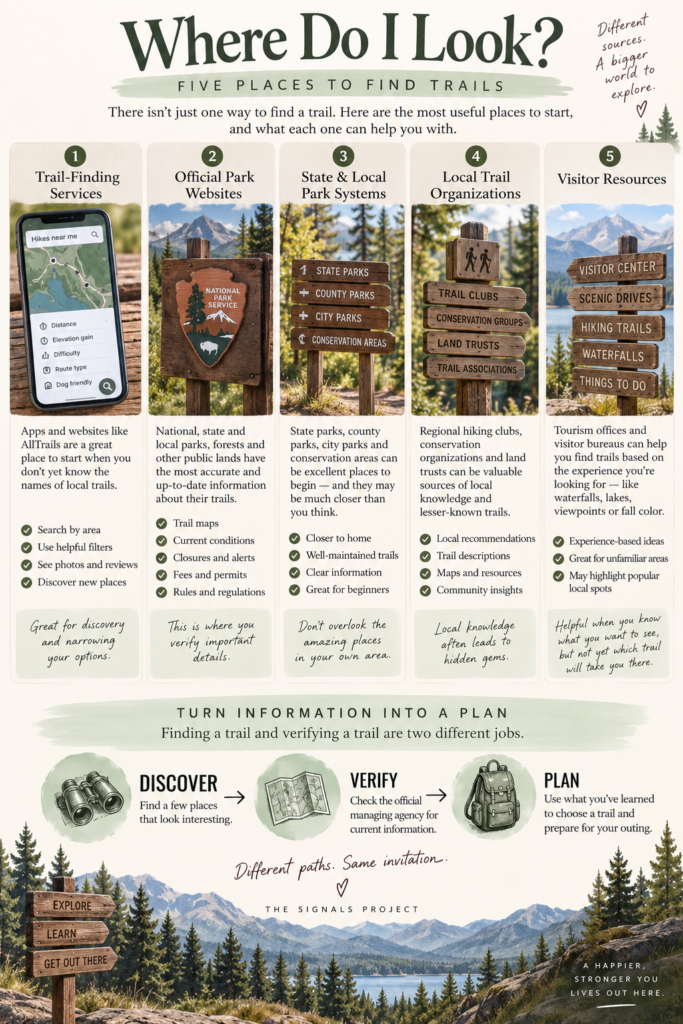
Now that you have a general idea of what you’re looking for, it’s time to see what’s actually out there. There isn’t one perfect place to find trails, and you don’t need to know every resource available. A few good starting points are usually enough.
Trail-finding services
Trail-finding websites and apps such as AllTrails can be especially useful when you don’t yet know the names of the places around you. Instead of searching for a particular trail, you can start with an area and narrow the results using the things you just decided: distance, elevation gain, difficulty, route type, dog access and the kinds of features you’d like to find.
This is where those first six questions begin doing some work. Rather than scrolling through every trail within driving distance, you can look specifically for something like a shorter, easier loop within an hour of home that allows dogs and leads to a lake. You don’t have to know the name of the trail before you begin. The filters help you discover it.
Official park and land-management websites
National, state and local parks, forests, wildlife areas and other public lands often have their own websites with trail maps, descriptions, access information and regulations. These sites can be especially useful once you know the general area you’re interested in exploring.
They also serve a different purpose from a trail-finding service. The organization responsible for managing the land is the place to look for authoritative information about things such as current closures, permits, fees, seasonal road access and rules that apply to that particular location.
State and local park systems
Don’t overlook the places managed closer to home. State parks, county parks, city parks, conservation areas and regional trail systems can be excellent places to begin, particularly if you’re not interested in turning your first hike into an expedition. Many have established parking, clearly identified trails and useful visitor information, and some may be much closer than the famous destinations that dominate search results.
Local trail organizations
Regional hiking clubs, trail associations, conservation organizations and land trusts can be useful sources of local knowledge. Depending on the organization, you may find trail descriptions, maps, suggested routes, information about local trail systems or links to the agencies responsible for the land.
These resources become especially helpful as you start learning what’s around you. A trail system that barely appears in a broad internet search may be very familiar to the people who actually maintain, advocate for or regularly use it.
Local visitor resources
Tourism offices and visitor bureaus can also be useful for discovery, especially when you’re exploring an unfamiliar town or region. Their recommendations are often organized around the experience rather than hiking terminology—waterfalls to visit, scenic walks, lakes, viewpoints or places to see fall color—which can be helpful when you know what you’d like to experience but don’t yet know what trail will take you there.
The important thing is to understand that finding a trail and verifying a trail are two different jobs. A trail-finding service, local article or visitor guide may introduce you to a place you didn’t know existed. Once something makes your shortlist, find out who actually manages that land and check the current information there before you make your final plans.
Think of it this way:
DISCOVER somewhere you might want to go.
VERIFY the important details with the managing agency.
PLAN the outing using the current information you’ve gathered.
You don’t have to get everything right during the first search. Right now, you’re simply trying to turn “I’d like to go hiking” into “Here are two or three places that might work.”
Meet Cedar Lake Loop
For the rest of this guide, we’re going to use one fictional trail to learn how all of this works. Meet Cedar Lake Loop.
Cedar Lake Loop doesn’t exist, which is exactly what makes it useful. Instead of borrowing a real trail whose conditions, rules or access could change, we’ve created one specifically for teaching. Its listing, map, trailhead, junctions and signs can stay consistent while we take them apart piece by piece and learn what each part is telling you.
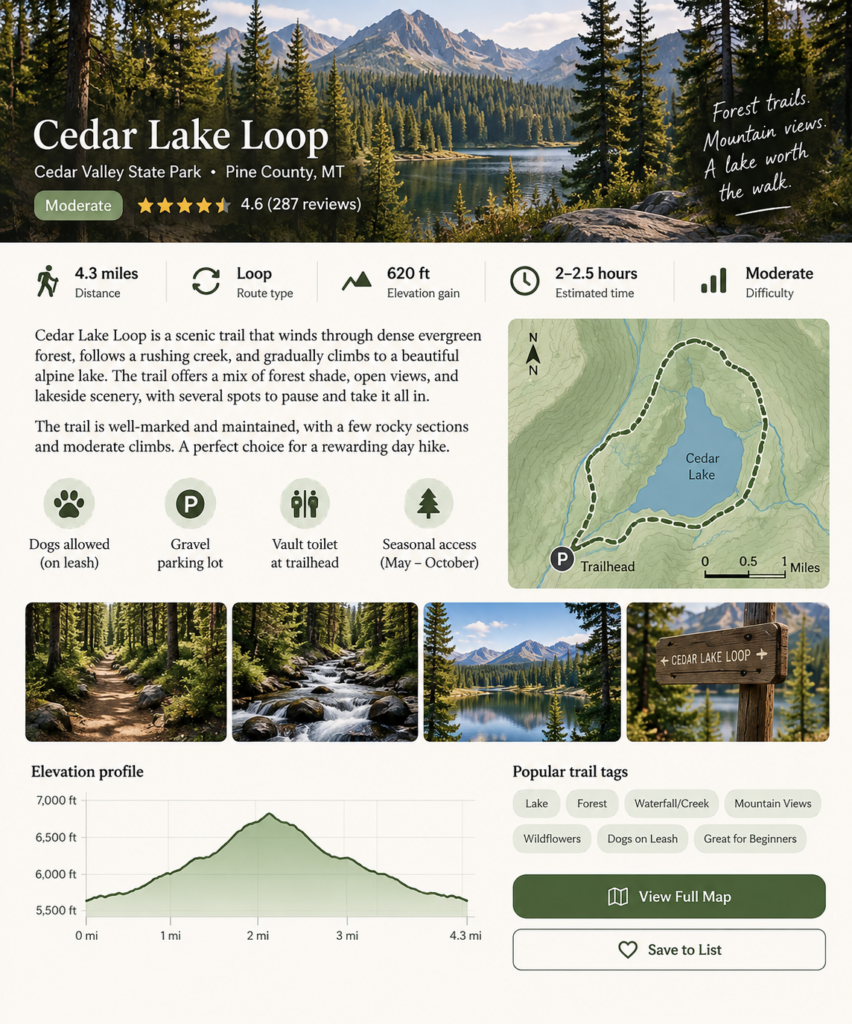
If you found Cedar Lake Loop while searching for somewhere to hike, the basic listing might tell you that it’s a 4.3-mile loop with 620 feet of elevation gain and a moderate difficulty rating. You might also learn that it takes roughly two to two and a half hours, travels over packed dirt with roots and rocky sections, passes through forest and alongside a creek before reaching a lake, and allows dogs on leash. There’s a small gravel parking lot and a vault toilet at the trailhead, and access is seasonal.
If some of that information already makes perfect sense to you, great. If you’re wondering what 620 feet of elevation gain actually feels like, whether 4.3 miles is the total distance, what makes a loop different from other route types, or how much faith you’re supposed to put in the word moderate, you’re exactly where you’re supposed to be.
We’re going to keep coming back to Cedar Lake Loop as we learn. First we’ll read its trail listing. Later we’ll use its map to find the parking area, trailhead, creek crossing, junction, steeper climb, viewpoint and lake. By the time we’re finished, the information that initially looks like a collection of unfamiliar words, numbers and symbols should begin to look much more like what it really is: a set of clues about the outing you’re considering.
Learn to Read a Trail Listing
You have a possible trail in front of you. Now comes the part that can initially make a trail listing look more complicated than it really is.
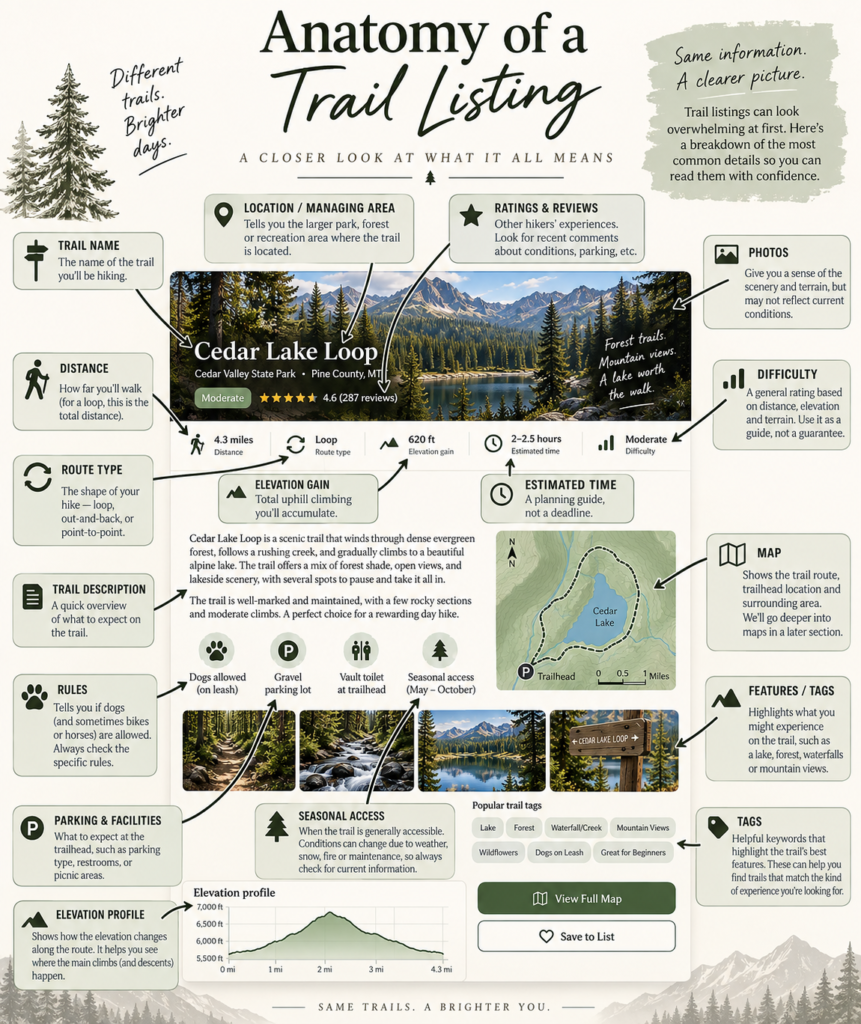
Most of the information on that Cedar Lake Loop listing is there to help you answer a handful of practical questions: How far will I walk? How much climbing will I do? What kind of terrain should I expect? How long might it take? What will I find there? Are there rules or access issues I need to know about?
Once you understand what the common pieces mean, a trail listing stops looking like outdoor shorthand and starts becoming a preview of the outing.
Distance
Cedar Lake Loop is listed as 4.3 miles. On a loop trail, that generally refers to the length of the complete route: you begin near the trailhead, follow the loop and eventually return to where you started.
Don’t assume every distance you see works exactly the same way, though. A listing might describe the total route, the one-way distance to a destination, or the distance of only one section of a larger trail system. Look at the route description and map rather than relying on the number by itself. What you ultimately want to know is simple: approximately how many miles will I actually walk before I’m back at my car?
Distance is also only one part of estimating how demanding a hike may be. Four miles over relatively smooth, gentle terrain can be a very different outing from four miles involving sustained climbing, loose rocks, roots or difficult footing. That’s why the next number matters.
Elevation Gain
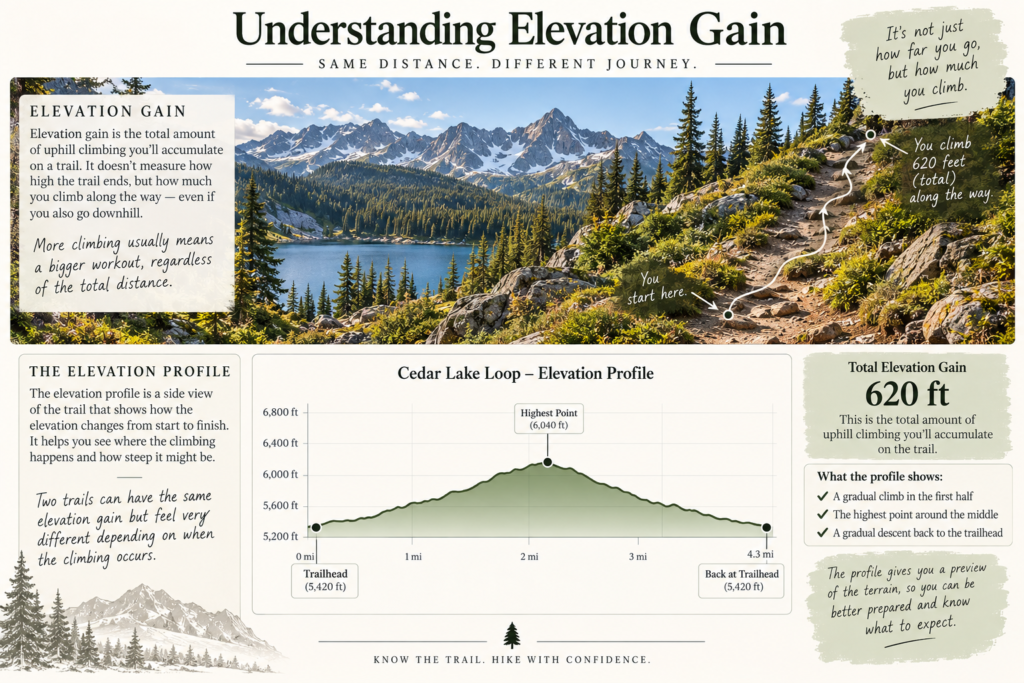
Cedar Lake Loop lists 620 feet of elevation gain. Elevation gain describes the amount of uphill climbing accumulated along the route. It is not simply the difference between the elevation where you begin and the highest point you reach; a route that climbs, descends and climbs again can accumulate elevation gain along the way.
That number becomes much more useful when you consider it alongside distance. Six hundred feet of climbing spread gradually across several miles is different from gaining roughly the same amount over one short, steep stretch. Two trails can therefore have similar distances and even similar total elevation gain while feeling quite different underfoot.
You don’t need to memorize a chart telling you what amount of elevation gain you are “supposed” to be able to handle. At first, use the number comparatively. As you hike more trails, you’ll begin developing your own frame of reference: I walked about this far with about this much climbing last time, and this is how it felt.
The Elevation Profile
The graph near the bottom of our Cedar Lake listing adds another piece to the elevation story. An elevation profile shows how the height of the trail changes as you move along the route. Read it from left to right as though you’re traveling along the trail.
Our fictional profile rises during the first portion of the hike, reaches its higher terrain around the middle of the route, and then generally descends on the return side. That tells you something the number 620 ft cannot tell you by itself: roughly where the climbing happens.
When you encounter an elevation profile on a real listing, look at both axes. The horizontal axis usually represents distance along the route, while the vertical axis represents elevation. A line that rises gradually tells a different story from one that shoots upward over a short distance. You don’t need to analyze the graph like homework. You’re simply learning to ask, Where does this trail climb, and how is that climbing distributed across the walk?
Route Type
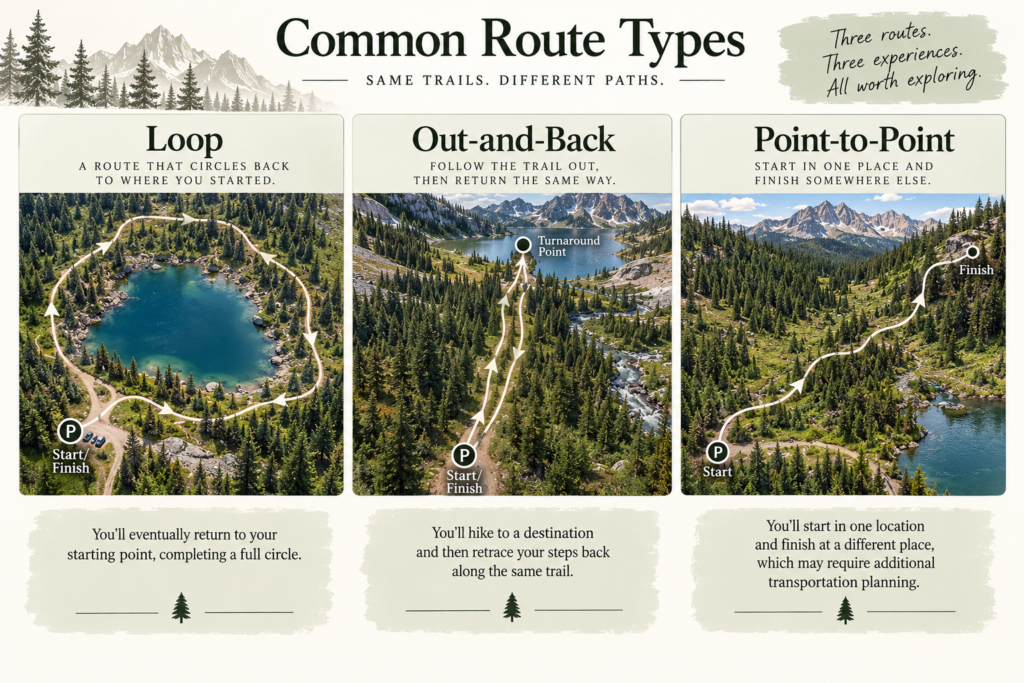
Cedar Lake is a loop, which means the route eventually circles back toward its starting point rather than requiring you to retrace the entire trail.
You’ll commonly encounter two other terms as well. An out-and-back route takes you from the starting point toward a destination or turnaround point and then brings you back along the same trail. A point-to-point route begins in one location and ends somewhere else, which can require additional transportation planning because your car may be back where you started.
Route type matters for more than vocabulary. It helps you understand what the mileage means, what the return trip will look like and whether you need to think about transportation at the other end.
Difficulty
Cedar Lake is labeled Moderate. Difficulty ratings are useful for comparing options, but they are not an objective promise about how a trail will feel to you.
A rating may take factors such as distance, elevation gain and terrain into account, but it cannot account for everything happening on the day you arrive—or everything particular to the person walking it. Heat, altitude, mud, snow, recent rain, carrying weight, your experience on uneven terrain and your own conditioning can all change the experience.
The same caution applies to labels such as “Great for Beginners.” Treat them as useful clues, not certifications. A trail-finding service does not know your body, your experience or the conditions you’ll encounter that day. Look at the information underneath the label and decide whether the actual trail characteristics make sense for you.
Estimated Time
Our fictional listing estimates two to two and a half hours. Think of an estimated time as a planning tool, not a deadline.
Your pace may be faster or slower depending on terrain, climbing, weather, how often you stop, whether you’re taking photographs, whether you’re walking with someone else, and a dozen other perfectly ordinary variables. A hike isn’t late because you stopped beside the creek for ten minutes.
What the estimate can do is help you plan the larger outing. A trail expected to take a couple of hours is a very different commitment from one commonly requiring most of the day. Later, when you’re preparing for the hike, you’ll combine that information with things such as daylight, weather and your travel time.
Surface and Terrain
A trail description may tell you whether you’ll encounter packed dirt, pavement, gravel, sand, rocks, roots, boardwalks, creek crossings or other terrain. Cedar Lake has packed dirt along with roots and rocky sections.
Pay attention to this information even if the mileage and elevation look comfortable. Terrain affects pace, footing and how physically demanding a route may feel. It can also help you decide whether the trail suits the people coming with you and what footwear (affiliate link) or other preparation may make sense.
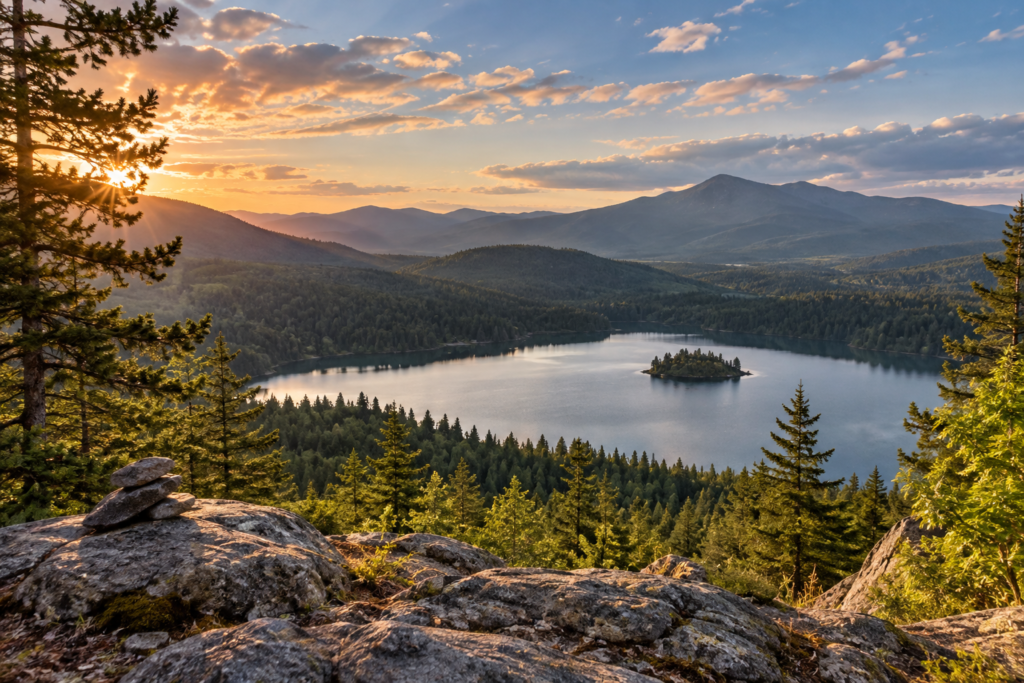
Photographs can offer additional clues. Look beyond the beautiful lake in the hero image and examine photographs of the trail itself when they’re available. They may help you visualize its width, surface, exposure and general character. Just remember that photographs may have been taken during another season or under very different conditions, so they aren’t a substitute for current information.
Location and Managing Area
Our fictional listing places Cedar Lake Loop inside Cedar Valley State Park. That larger place name matters because the trail and the park are not the same thing.
A park, forest, preserve or recreation area may contain many trails, entrances, roads and parking areas. Knowing the larger managing area helps you find official information, but it doesn’t necessarily tell you where to drive for this particular hike.
We’re going to spend an entire section on this distinction shortly, because understanding the difference between the park, trail, trailhead and parking area can eliminate a surprising amount of first-time confusion.
Features and Tags
Listings often identify features such as lakes, waterfalls, forests, creeks, mountain views or wildflowers. This is where the question you answered earlier—What kind of experience do I want?—comes back into play.
Tags can be wonderful discovery tools. If what you really want is a walk through autumn color or a trail beside water, they can help you narrow the choices without knowing the names of specific trails beforehand. They are less about determining whether you can do the trail and more about helping you decide whether you want to.
Dogs and Other Rules
Cedar Lake says dogs are allowed on leash. If Oreo were coming, that would put the trail on our possible list. It would not end our research.
“Dogs allowed” doesn’t necessarily tell you every rule that applies. A managing agency may specify leash length, restrict dogs from particular areas, impose seasonal rules or have other requirements. The same principle applies to bicycles, horses, camping, fires and other activities you may see mentioned in trail information.
Use the listing to identify the possibility. Then verify the actual rules with whoever manages the land.
Parking, Facilities, Fees and Permits
Our Cedar Lake listing shows a small gravel parking lot and a vault toilet at the trailhead. Real listings may tell you about restrooms, drinking water, picnic areas, visitor centers, parking capacity or the complete absence of facilities. “No facilities” is useful information too; it tells you what not to expect when you arrive.
Also look for parking fees, entrance fees, recreation passes, permits or reservations. These are not interchangeable. Depending on the place, you might need to pay to enter or park, display a particular pass, reserve a parking time or obtain a permit for the trail or activity itself.
If any of those apply, don’t rely solely on an old review or trail listing for the details. This is information to verify with the managing agency before you go.
Seasonal Access
Our fictional Cedar Lake listing says May–October. That doesn’t mean a magical gate opens on May 1 and conditions remain perfect until midnight on October 31. It means access is generally seasonal.
Snowpack, storms, wildfire, flooding, road conditions, maintenance and other circumstances can affect when a real trail or the road leading to it is accessible. A seasonal range is therefore a planning clue, not a guarantee.
This is particularly important when the trailhead is reached by a seasonal or unpaved road. Your navigation app may know that a road exists without knowing whether you should—or currently can—drive it.
Recent Conditions and Closures
Before you commit to a trail, look for current information. A trail that was perfectly accessible last summer may have a temporary closure, damaged bridge, washed-out road, wildfire restriction or other issue today.
Recent user reviews can sometimes alert you to things people have encountered lately, such as mud, snow or a crowded parking lot. They can be useful observations, but they are not the final authority on whether a trail or road is officially open.
For closures, restrictions, permits and current official access information, go back to the managing agency we talked about in the previous section.
Ratings and Reviews
The star rating and review count on our fictional Cedar Lake listing probably need the least explanation. They’re other people’s assessments of their experiences, and they can help you notice patterns. If many people mention confusing signage at the same junction, difficult parking or a particularly rocky section, that’s information worth noticing.
Just keep reviews in their proper role. They’re personal experiences, sometimes written by people whose ability and expectations may be very different from yours. They’re also snapshots from particular days. Use them to gather context, not to override official information or decide what your own experience should feel like.
A trail listing isn’t asking you to understand everything about the outdoors before you leave home. It’s giving you pieces of information you can use to decide whether this particular outing belongs on your shortlist.
Distance tells you how far. Elevation gain and the elevation profile tell you about the climbing. Route type tells you the shape of the journey. Difficulty, terrain and estimated time help you think about the physical experience. Features tell you what might make the outing worth taking. Rules, facilities, access information and current conditions tell you what you need to know before you actually go.
Once you start reading listings this way, all those little numbers, labels and symbols stop looking like a secret language.
They start answering questions.
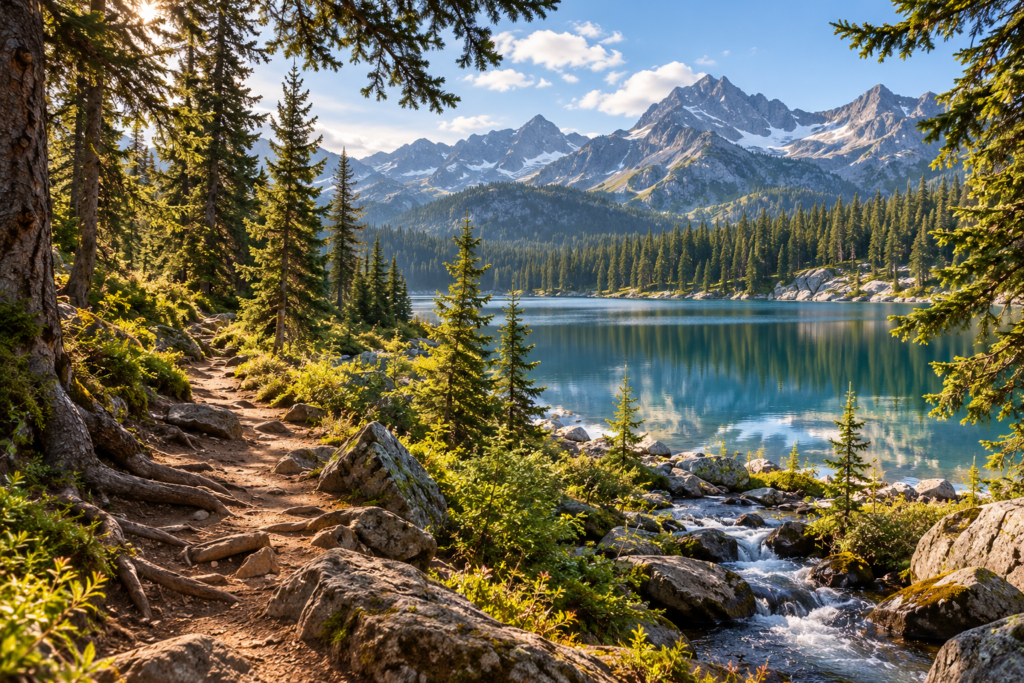
Figure Out Where You’re Actually Going
You found Cedar Lake Loop. You read the listing, looked at the distance and elevation gain, checked the route type and decided it sounds like an outing you’d like to try. It would be very reasonable at this point to think the next step is simply typing Cedar Valley State Park into your navigation app and getting in the car.
Not quite.
One of the most useful things to understand before your first unfamiliar hike is that the park, the trail, the trailhead and the parking area are four different things. Sometimes they sit so neatly together that the distinction barely matters. Other times, confusing them can send you to the wrong side of a very large piece of land.
The Park or Managing Area
Think of Cedar Valley State Park as the big container. It is the larger area of land where our fictional hike is located. A real state park, national park, national forest, preserve or recreation area might contain multiple roads, entrances, parking areas, campgrounds, lakes, visitor facilities and dozens—or even hundreds—of miles of trails.
Knowing the name of the park tells you where the trail lives. It does not necessarily tell you where your particular hike begins.
This becomes especially important with enormous public lands. Typing the name of an entire national forest into navigation is a little like typing the name of a city when what you actually need is the address of one restaurant. Technically, you’re headed toward the right general place. Practically, that may not be nearly specific enough.
The Trail
Cedar Lake Loop is the trail—the route you’re planning to walk. A trail may exist entirely within one park or recreation area, connect with other trails, cross different kinds of public land or be part of a much larger trail system.
The trail name helps you identify the route you want, but even that may not be enough information for your drive. Some trails can be accessed from more than one location, and different trails sometimes begin from the same general trailhead area.
What you need next is the place where you actually enter the trail.
The Trailhead
The trailhead is the designated access or starting point for the trail or trail system. It may have a sign, kiosk, map, trail register, restroom or other facilities—or it may be much simpler. Official definitions describe trailheads as designated access points or developed places that provide the transition into trail use.
For Cedar Lake Loop, this is the location we ultimately care about when we’re figuring out where to drive. We don’t merely want to arrive somewhere inside Cedar Valley State Park. We want to reach the Cedar Lake Trailhead.
And trailheads don’t always have ordinary street addresses. Official geographic guidance notes that a trailhead may instead be identified by a road name, crossroads or other location information. This is one reason the directions provided by the managing agency can matter so much.
The Parking Area
Finally, there is the parking area: where you actually leave the car.
Sometimes the parking lot is directly beside the trailhead, and the whole thing feels like one place. Other times you may park some distance away and walk to the trailhead. There may be a dedicated lot, roadside parking, an overflow area or more than one parking option. The Appalachian Trail, for example, has trailhead parking areas at or near many public road crossings—useful real-world evidence that “parking” and “trailhead” shouldn’t automatically be treated as interchangeable terms.
Our Cedar Lake listing tells us there is a small gravel parking lot at the trailhead, so our fictional example is fairly straightforward. But now you know what you’re checking when a real listing isn’t so simple.
Find the Specific Place, Not Just the General Area
Once you’ve chosen a trail, find the official information for that trail or trailhead and look for its directions and access details. If the managing agency provides a specific trailhead location, road directions or parking instructions, use those rather than assuming that searching for the name of the larger park will put you in the correct place.
Then compare what you’ve found with your navigation route before you leave. You’re looking for agreement: Yes, this road approaches from the direction described. Yes, this is the named trailhead. Yes, this appears to be the parking area associated with it.
That little bit of checking can prevent a surprisingly frustrating beginner experience: arriving somewhere beautiful, getting out of the car and realizing you have absolutely no idea whether you’re standing anywhere near the trail you came to hike.
For now, remember the relationship:
The park is the larger place. The trail is the route you walk. The trailhead is where you access or begin that route. The parking area is where you leave the car.
They may all be close together.
They are not all the same thing.
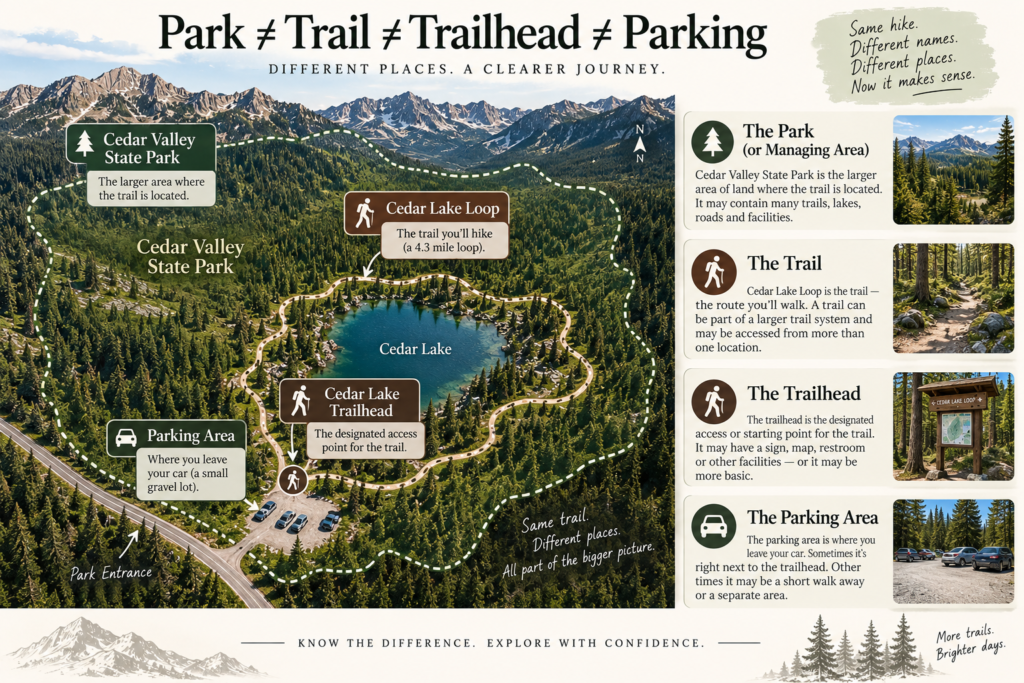
Figure Out Where You’re Actually Driving
Once you know the name of the trailhead, getting there may seem like the easy part. Type it into your navigation app, follow the blue line and eventually arrive at a parking lot. Sometimes that is exactly how it works. Sometimes it very much is not.
Trailheads are often located far from ordinary street addresses, particularly on national forest land, in large parks or in more remote recreation areas. Official directions may tell you to turn onto a named road, continue for several miles, take a numbered forest road at a junction and follow signs from there. Some official trailhead pages provide latitude and longitude along with written driving directions rather than relying on a conventional address.
That means your navigation app is useful, but it should not be the only thing you consult.
Start With the Official Directions
Once you have identified the correct trailhead, find the directions provided by the park, forest or other agency that manages it. Read them before you leave rather than assuming you’ll figure everything out once you’re close.
Pay particular attention to the last portion of the drive. What road leads to the trailhead? Is there a turn onto a forest or service road? How many miles do you travel after that turn? Are there signs or landmarks mentioned along the way? Is the road paved, gravel or dirt? Does the agency mention seasonal closures, gates or vehicle restrictions?
Those details give you something extremely useful: a description of what the drive is supposed to look like.
Now compare that with the route your navigation app has chosen. If the official directions say you should approach the trailhead from the south on Forest Road 12 and your phone wants to send you down an entirely different road from the north, don’t automatically assume the phone discovered a clever shortcut. Stop and investigate the discrepancy.
There are real places where this matters. Mount Rainier National Park warns that GPS can direct visitors to the wrong entrance or toward closed gates, potentially creating hours of rerouting. Mojave National Preserve warns that GPS data in remote areas may be outdated and can send travelers onto primitive or four-wheel-drive roads for which they are unprepared.
A Road on the Map Is Not Necessarily a Road You Want to Drive
A thin line on a digital map can hide a remarkable amount of information.
An access road might be paved and perfectly ordinary. It might also be gravel, deeply rutted, narrow, steep or seasonally maintained. Some roads require high clearance or four-wheel drive. Others may become impassable after rain or snow. Canyonlands National Park, for example, specifically notes that some areas are reached only by unpaved roads and that certain roads can become impassable when wet.
This doesn’t mean you should be afraid of every unpaved road. Plenty of trailheads are reached by perfectly manageable gravel roads. It means “the navigation app found a route” and “this route is appropriate for my vehicle today” are two different pieces of information.
If the official trail information mentions the access road, read that information. If it specifies high clearance, four-wheel drive or another vehicle requirement, believe it. If it tells visitors to use a particular road, use that road rather than improvising a shortcut because another route appears shorter on the screen.
Watch for Seasonal Roads and Gates
Road access can change with the season even when the trail itself still exists exactly where the map says it does. Mountain roads may close because of snow, gates may be locked during part of the year, and storms or other conditions can temporarily affect roads that are normally open. Mount Rainier, for example, tells visitors to check road status and alerts because closures and gate conditions can change.
This is why checking access belongs in your planning process rather than in the parking lot. Before you leave, confirm that the road you intend to use is currently open and that any seasonal restrictions make sense for the date of your trip.
Know What the Last Few Miles Look Like
For an unfamiliar trailhead, I like to think of the final few miles of the drive as part of the hike preparation.
Before you leave home, look at the route closely enough that you know when the straightforward part ends. Maybe you leave the highway, drive through a small town, turn onto a paved park road and eventually take a gravel road for the final three miles. Maybe the trailhead is simply beside a county road. Maybe you have several turns after cell service becomes unreliable.
You don’t need to memorize every turn. You simply want enough familiarity that the real world and the directions you’ve researched continue to agree with each other.
If the official directions say the trailhead is five miles down a gravel road and you have driven twelve miles without seeing the expected junction, that’s useful information. If you’re expecting a maintained gravel road and your navigation suddenly tells you to turn onto something that looks like an abandoned two-track through the woods, that’s a reason to stop rather than blindly obey the next instruction.
The National Park Service gives exactly this kind of warning at Pictured Rocks, advising visitors to use official park roads and maps rather than allowing navigation apps to lead them onto narrow dirt roads, two-tracks or possible dead ends.
Save What You Need Before You Leave
Cell service tends to become least reliable precisely when you’d most like to ask your phone where you are.
Before leaving home, save or screenshot the official driving directions and any access information you may need. If your navigation app allows you to download the relevant area for offline use, do that as well. Save the trailhead location, not merely the name of the park, and keep enough information available offline so that losing a signal doesn’t also mean losing your plan.
You are not trying to navigate the wilderness from memory. You’re simply making sure the directions you already researched don’t disappear because your phone suddenly has no bars.
By the time you pull out of the driveway, you should be able to answer three questions: Where exactly am I driving? What should the final part of the drive look like? Is that route currently open and appropriate for my vehicle?
If you can answer those, the drive becomes much less mysterious. Your navigation app can do what it does well—help you follow the route—while the official information does what it does better: tell you whether that’s the route you should actually be taking.
Parking Is Part of the Plan
Parking may feel like such a minor detail that it barely deserves a place in your hiking plans. You’re going for the trail, after all, not the parking lot. But knowing what to expect when you arrive can make the difference between stepping out of the car ready to go and discovering that the outing has presented you with a problem before you’ve even put on your backpack.
Start by finding out what kind of parking actually exists at the trailhead. Cedar Lake makes this easy for us: our fictional listing tells us there is a small gravel lot at the trailhead. On a real hike, you might find a large paved lot, a handful of designated spaces, roadside parking, an overflow area or parking located some distance from the trail itself. Some popular trailheads have very limited parking and may fill early; at Bright Angel Trailhead in Grand Canyon National Park, for example, the National Park Service specifically warns that the nearby parking is limited and often fills early, then provides alternate parking and shuttle options.
Check the Rules Before You Go
Don’t assume that seeing an open patch of roadside near a trailhead means you’re allowed to park there. Some locations permit roadside parking in designated areas; others prohibit it. Parking instructions may also tell you not to block gates, roads or private access. Shenandoah National Park’s trailhead-access information, for example, identifies everything from dedicated lots to extremely limited roadside spaces and specifically warns visitors not to block roads or gates.
Also check whether parking requires a fee, pass, permit or reservation. Depending on the destination, that may be completely separate from any entrance fee or trail permit you’ve already researched. If something must be purchased or reserved in advance, finding that out while you’re still sitting at home is considerably nicer than discovering it beside a full parking lot with questionable cell service.
Have a Plan for a Full Lot
If the trail is popular or the parking area is small, look for official information about what happens when the lot fills. Is there an overflow lot? A shuttle? Another legitimate place to park? Or does a full lot simply mean you’ll need another plan?
This is one of those moments when improvisation isn’t always your friend. Parking farther down the road and walking back may seem harmless, but roadside parking can be prohibited or unsafe, and parking outside designated areas can damage vegetation or block traffic. At some trailheads, there simply isn’t another legal place to put the car.
If parking is known to be difficult, you can also make that part of your decision about when to go. An earlier start, a weekday visit or a less-busy season may make the same trail a very different experience.
Know Where the Car Is
One final habit costs almost nothing and can be surprisingly useful: before you walk away, make sure you know exactly where you parked.
If you’re in a large or unfamiliar lot, drop a pin in your phone or save the location if your mapping app allows it. If you’re parked along a road or in an overflow area, pay attention to which direction you walked to reach the trailhead. Don’t assume the parking situation will look identical when you return several hours later surrounded by different cars.
And before you leave the vehicle, secure it properly and don’t leave valuables sitting visibly inside. At remote Shenandoah trailheads, the National Park Service specifically reminds visitors to lock their vehicles and secure valuables.
Parking isn’t the interesting part of the adventure. That’s precisely why it’s worth sorting out beforehand. Know where you’re allowed to leave the car, whether you need to pay or reserve anything, what you’ll do if the lot is full, and how you’ll find your way back to it.
Then you can stop thinking about the car and go find the trail.
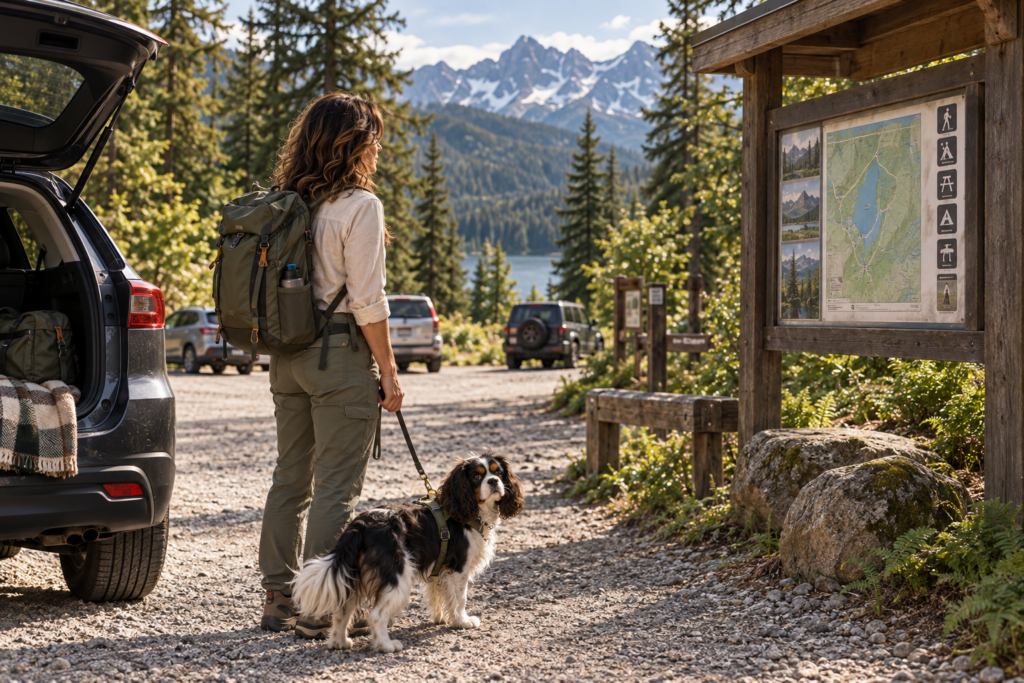
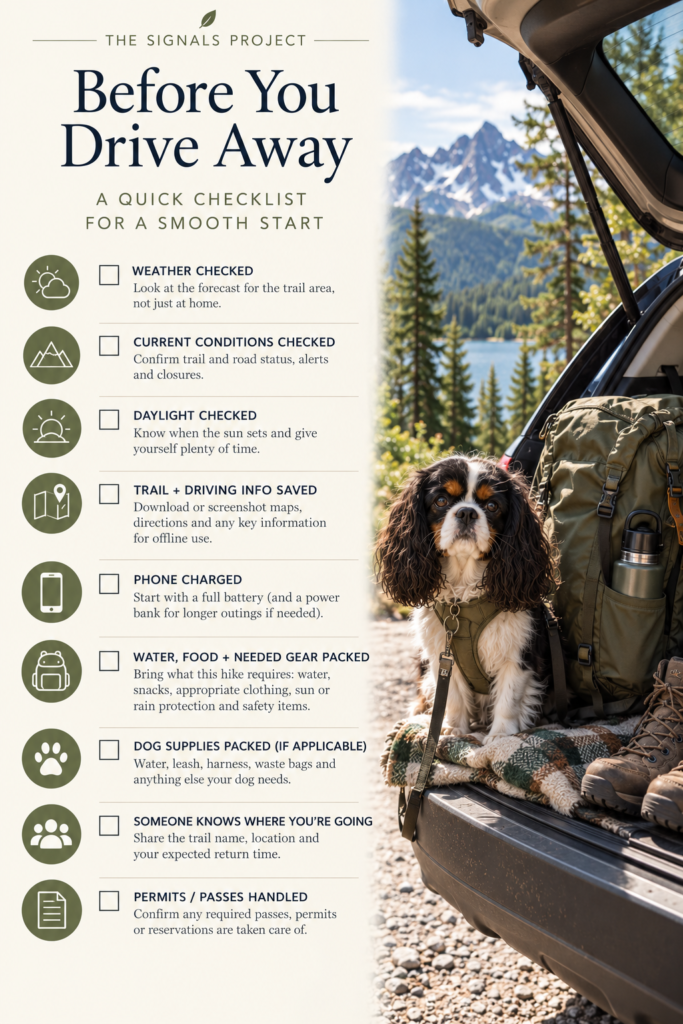
Before You Leave Home: Do the Last Check
By the time the day of your hike arrives, most of the planning is already done. You know where you’re going, how long the trail is, what the terrain looks like, where you’re driving and where you expect to park. Before you leave, take a few minutes to make sure the information you gathered earlier still matches the day you’re actually heading out.
Check the Weather
Look at the forecast for the trail area, not simply the weather at home. If the trail climbs significantly in elevation or is some distance away, conditions there may be very different. Pay attention to temperature, precipitation, wind and any weather advisories that could affect the outing. In mountain environments especially, conditions can change quickly, so the forecast is information for making a decision, not a guarantee of what the entire day will look like.
Check Current Conditions and Alerts
Return to the managing agency’s website and look for current alerts, closures and access information. Confirm that the trail and the road leading to it are open and check for anything that has changed since you originally planned the hike. Recent trail reports or reviews can provide additional observations about things such as mud, snow, downed trees or creek levels, but official closures and restrictions should come from the agency responsible for the land.
Check Daylight
Know approximately when the sun sets and give yourself considerably more time than the estimated hiking time requires. A two-hour trail does not mean you should begin two hours before sunset. You’ll need time for parking, getting ready, finding the trailhead, stopping along the way and dealing with anything that takes longer than expected. For a beginner especially, daylight is something to build a generous margin around rather than something to race.
Check What You’re Bringing
This section contains affiliate links. If you purchase through one, I may earn a small commission at no additional cost to you.
You don’t need an expedition’s worth of equipment for every walk but make sure you have what this particular outing requires. Water, appropriate footwear and clothing, any food or snacks you planned to bring, sun or rain protection as conditions require, and the basic safety items you’ve chosen should be packed before you leave. If Oreo is coming, his water, leash and anything else he needs belong on the list too.
This is also the moment to make sure your phone is charged and that the information you may need without cell service is actually available offline. Save the trail map, trailhead location, driving directions and any permits or passes you’ll need to show.
Tell Someone Where You’re Going
Before heading out, make sure someone who isn’t going with you knows where you’re hiking and when you expect to return. Give them the actual trail name and location rather than simply saying you’re “going hiking.” If your plans change and you choose another trail, update them.
This matters whether you’re hiking alone or with other people. The purpose isn’t to make the outing feel dangerous; it’s to make sure someone knows where to start looking if you don’t return when expected.
Give Yourself Permission to Change the Plan
The last check isn’t a ritual you perform before going no matter what you discover. Its entire purpose is to give you one final opportunity to decide whether today is still a good day for this particular hike.
If the weather changed, the access road closed, wildfire smoke moved in, conditions deteriorated or something simply no longer makes sense, choose another trail or another day. The work you put into planning the outing hasn’t been wasted. You learned how to find and evaluate a trail, and you can use exactly the same process again.
A good plan should make it easier to go.
It should also make it easier to decide not today when the information tells you that’s the better choice.
You Arrived. Now What?
This section contains affiliate links. If you purchase through one, I may earn a small commission at no additional cost to you.
You made it. The directions matched the road, the parking area exists where you expected it to, and somewhere beyond the windshield is the trail you’ve spent all this time figuring out how to find.
Before you shoulder your pack and start walking, spend a few minutes getting oriented. An unfamiliar trailhead can contain more information than you realize, and this is the easiest place to make sure the real world matches the plan you made at home.
Confirm You’re at the Right Trailhead
Start with the obvious question: Am I actually where I think I am?
Look for the trailhead name on a sign, kiosk or posted map and compare it with the trail information you saved. If several trails begin from the same area, identify the name of the specific trail or junction you’ll use to begin Cedar Lake Loop.
Don’t worry if the sign doesn’t say CEDAR LAKE LOOP in enormous letters. A named hike may use portions of several trails, and the trailhead may serve multiple routes. What matters is that you can connect what you’re seeing on the ground with the route you researched.
Read the Trailhead Kiosk
If there is a kiosk or information board, take a minute to look at it before you leave.
You may find a map, current notices, closures, wildlife information, fire restrictions, permit requirements or other information specific to the area. Some of it may repeat what you already checked at home. That’s fine. You’re looking for anything new or different.
If a map is posted, find the YOU ARE HERE marker if there is one. Locate your trail and notice how it leaves the trailhead. You don’t need to memorize the entire map. You simply want to understand which direction you’re beginning.
This is also a good time to take a photograph of the posted map and any information you might want later.
Find the Actual Trail Entrance
A parking lot and a trailhead are not always arranged like a theme-park entrance with one enormous obvious path directly in front of you. There may be several paths leaving the area, a connector trail from the parking lot or multiple trails beginning from the same trailhead.
Look for the trail sign, marker or route name that matches your plan. Compare it with your saved map before you start walking.
If you can’t confidently identify where your route begins, figure that out while you’re still at the trailhead. Don’t choose the path that looks most trail-like and hope it sorts itself out later.
Notice How This Place Looks
Before you walk away, turn around.
Seriously.
Look back at the parking area and the trailhead from the direction you’ll see them when you return. Notice the kiosk, signs, road, distinctive trees, buildings or other obvious features around you. If the trail immediately branches near the parking area, notice which branch leads back to your car.
The beginning of a trail can look surprisingly different from the opposite direction several hours later. Taking ten seconds to see your return view now gives your brain one more piece of information to recognize later.
You can take a quick photograph if that helps.
Match the Trail to Your Map
Once you’ve found the trail entrance, look at the first portion of your saved route. Does the trail leave the parking area in the direction you expected? Is there an early junction you’ll need to watch for? Does your route follow a particular trail name, number, blaze or marker?
You aren’t trying to memorize four miles of turns before taking your first step. You’re simply identifying the next thing you need to know.
Maybe Cedar Lake Loop begins on Cedar Creek Trail and reaches the loop junction half a mile later. That’s enough for now. Your first job is to follow Cedar Creek Trail and recognize that junction when you reach it.
Then you’ll make the next decision.
Start With Certainty
There is no prize for marching confidently away from the parking lot thirty seconds after closing the car door.
Take the extra few minutes. Read the signs. Look at the map. Find your route. Notice your surroundings. Make sure you know what you’re following first.
Then start walking.
You don’t need to know the whole trail from where you’re standing.
You only need to know that you’re starting on the right one.
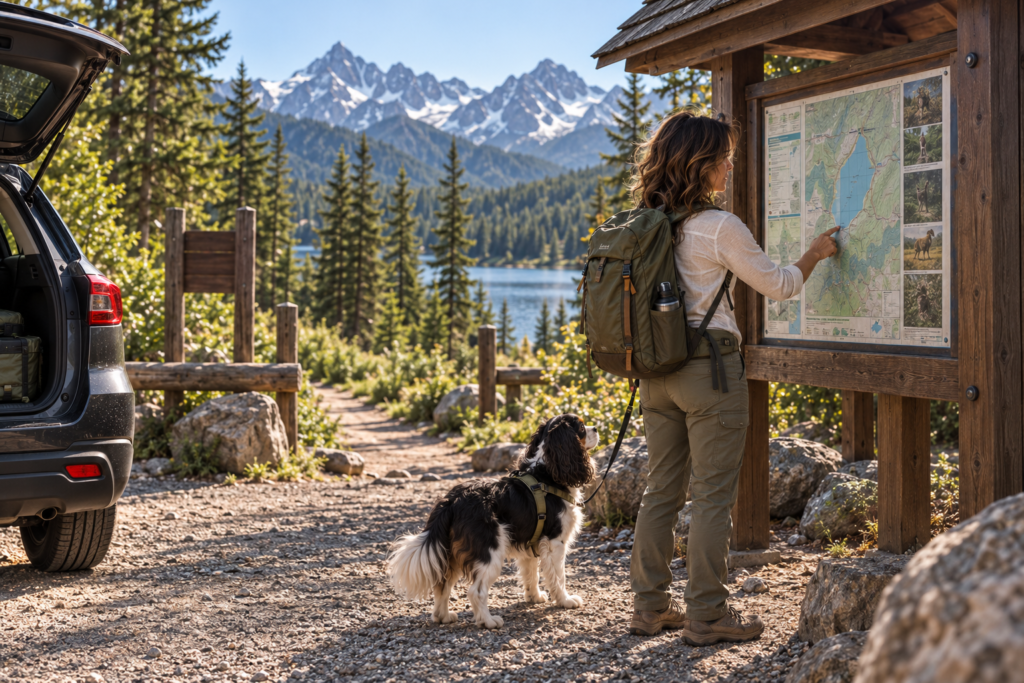
Learn to Read the Basic Map
A trail map can look intimidating when nobody has ever explained what you’re actually looking at. Lines go everywhere, symbols appear without much context, and somehow everyone else seems to know what all of it means.
You don’t need to become an expert navigator to understand a basic trail map. For now, you need enough information to locate yourself, recognize your route and understand the major features you’ll encounter along the way.
Start With “You Are Here”
If you’re looking at a map posted at a trailhead kiosk, the easiest place to begin is the YOU ARE HERE marker.
That gives everything else context. Find yourself first, then find the trail you’re planning to walk. From there, you can begin connecting the map to the landscape around you: the parking lot behind you, the trail leaving the kiosk, the lake somewhere ahead and the junction you’ll eventually reach.
On a map you’ve downloaded or printed, there may not be a convenient YOU ARE HERE marker. In that case, locate the trailhead or parking area where you’re starting.
Find the Trail
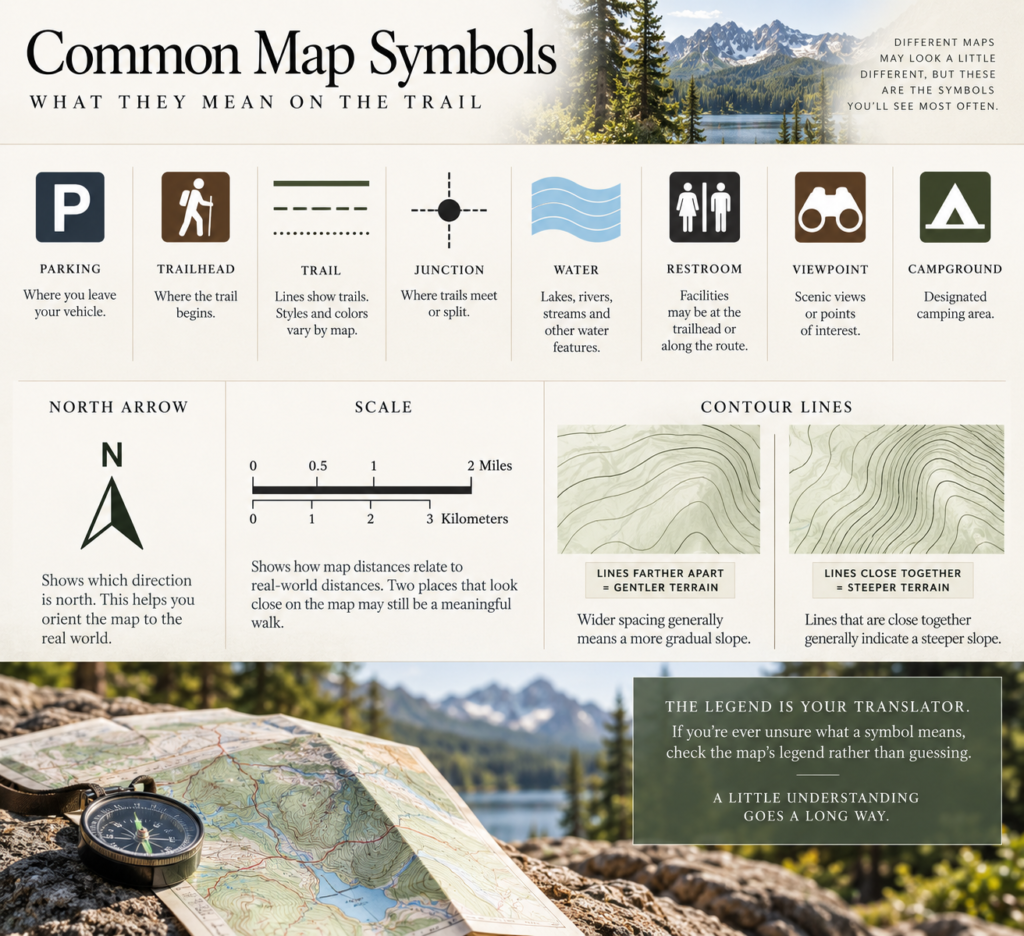
Trails are generally represented by lines, although the exact color and style vary from one map to another. Different kinds of lines may distinguish hiking trails from roads, boundaries or other routes, which is why you should always check the map’s legend rather than assuming you know what a particular line means.
Once you’ve identified your trail, trace it with your eyes. Where does it begin? Does it form a loop? Does another trail intersect it? Does it cross water or pass a landmark you might recognize?
You aren’t memorizing the route. You’re building a simple picture of it.
Learn the Useful Symbols
Maps use symbols to fit a great deal of information into a small space. Depending on the map, you may see symbols for parking, trailheads, restrooms, campgrounds, viewpoints, water features and other facilities or landmarks.
Again, the legend is your translator. If you don’t recognize a symbol, look there rather than guessing.
A junction is especially worth noticing. On the map, it is simply a place where trails meet or separate. On the ground, it is a place where you’ll probably need to make a decision. If you know beforehand that your first junction comes shortly after a creek crossing, you’ve given yourself two useful things to watch for.
Find North
This section contains affiliate links. If you purchase through one, I may earn a small commission at no additional cost to you.
Most maps include a north arrow or otherwise indicate which direction is north. You don’t need to spend the entire hike mentally calculating compass bearings, but knowing how the map is oriented helps you relate what you’re seeing on paper or your screen to the landscape around you.
If you rotate a digital map while using it, pay attention to whether north remains at the top or whether the map is rotating with your direction of travel. That small difference can make the same route look surprisingly different.
Look at the Scale
The scale tells you how distances on the map relate to distances in the real world.
This is useful because two landmarks that appear very close together on the screen may still be a meaningful walking distance apart. The scale gives you context for the space between the trailhead, junctions, viewpoints, water crossings and other features.
You don’t need to calculate every distance manually. You simply need to understand that the map is a reduced representation of a much larger landscape.
Contour Lines Without the Geography Class
Those looping, wavy lines covering many topographic maps are contour lines. Each line connects points at the same elevation, allowing a flat map to show you something that isn’t flat at all: the shape of the land.
For a beginner, one principle will take you surprisingly far:
Contour lines farther apart generally indicate gentler terrain. Contour lines packed closely together generally indicate steeper terrain.
You don’t need to calculate elevations between every line. Look at the pattern. If the lines become tightly compressed along one portion of your route, you’re looking at a steeper part of the landscape. If they spread farther apart, the terrain is generally less steep.
That means a map can tell you more than where the trail goes. It can begin showing you what the land underneath that trail is doing.
Use the Map as a Story of the Route
Now put the pieces together.
You begin at the parking area. The trailhead is beside it. Your trail leaves the trailhead and heads toward the creek. You cross a bridge, reach a junction, continue toward the lake, pass a viewpoint and eventually follow the loop back toward where you began.
Suddenly the map isn’t a collection of mysterious symbols.
It’s the story of the walk you’re about to take.
You don’t need to understand every mark printed on it. Find yourself. Find your trail. Notice the important junctions and landmarks. Check the legend when you don’t recognize something. Look at the contour lines enough to understand the general shape of the terrain.
That’s enough to start reading the map instead of merely looking at it.
Cedar Lake Loop: The Map
Now that the pieces of a trail map make a little more sense, let’s put them together.
This is Cedar Lake Loop, the fictional trail we’ve been using throughout this guide. Until now, you’ve mostly encountered it as information in a trail listing: 4.3 miles, 620 feet of elevation gain, a loop route through forest to a lake. On the map, those facts become a physical route you can actually follow.
Start Where You Already Know You Are
At the bottom of the map, you’ll find the parking area and the trailhead. Those are two different things, just as we discussed earlier. The parking symbol shows where you leave the car. The trailhead marks where the actual route begins.
From the trailhead, find the line representing Cedar Lake Loop and begin tracing it with your eyes.
You don’t have to study the entire map at once. Start exactly the way you would on the real trail: Where am I now, and where do I go first?
Follow the Route One Piece at a Time
From the trailhead, the route heads into the forest toward Cedar Creek. Soon you’ll reach a bridge where the trail crosses the water. Farther ahead is a junction, where another trail meets or leaves your route.
That junction matters because it’s a place where you’ll have a choice to make on the ground. Knowing that it exists before you reach it means it won’t come as a surprise.
Continue tracing the loop and you’ll eventually reach the viewpoint and Cedar Lake before the trail curves around and begins its return toward the trailhead.
Notice what you’re doing here. You’re not memorizing a sequence of dozens of turns. You’re identifying a handful of major features that can help you understand where you are:
Trailhead → creek → bridge → junction → viewpoint → lake → return.
Those features turn an abstract line on a map into a route you can recognize as you move through it.
Now Look at the Land Underneath the Trail
The contour lines add another layer of information.
Along some portions of Cedar Lake Loop, those lines are relatively far apart. Elsewhere, particularly around the steeper climbing section, they move closer together. You now know what that means: the land is rising more sharply there.
This gives context to the 620 feet of elevation gain we saw in the original trail listing. The number told us how much climbing occurs over the route. The contour lines begin showing us where some of that climbing happens.
You don’t need to calculate anything. You can simply look at the map and recognize that one part of the trail is likely to feel steeper than another.
Check the Other Map Tools
Find the north arrow. Find the scale. Look at the legend and compare its symbols with the ones used on the map.
These aren’t separate bits of map trivia anymore. Each one answers a question.
Which direction is north?
How far apart are these places?
What does that symbol mean?
Where does the trail go?
Where does the terrain get steeper?
Where will I encounter a junction?
Where does this route eventually bring me back?
That’s what reading a trail map really is: asking the map useful questions and knowing where to look for the answers.
You still don’t need to understand every line, number or symbol on a detailed topographic map. You don’t need to become a cartographer before you’re allowed to go for a hike.
For Cedar Lake Loop, you need to know where you start, recognize the route you’re following, understand the major landmarks and decision points along it, and see how that route eventually returns you to where you began.
And now you can.
The map that might have looked like a page full of mysterious lines twenty minutes ago is starting to look like something much simpler:
a picture of where you’re going.
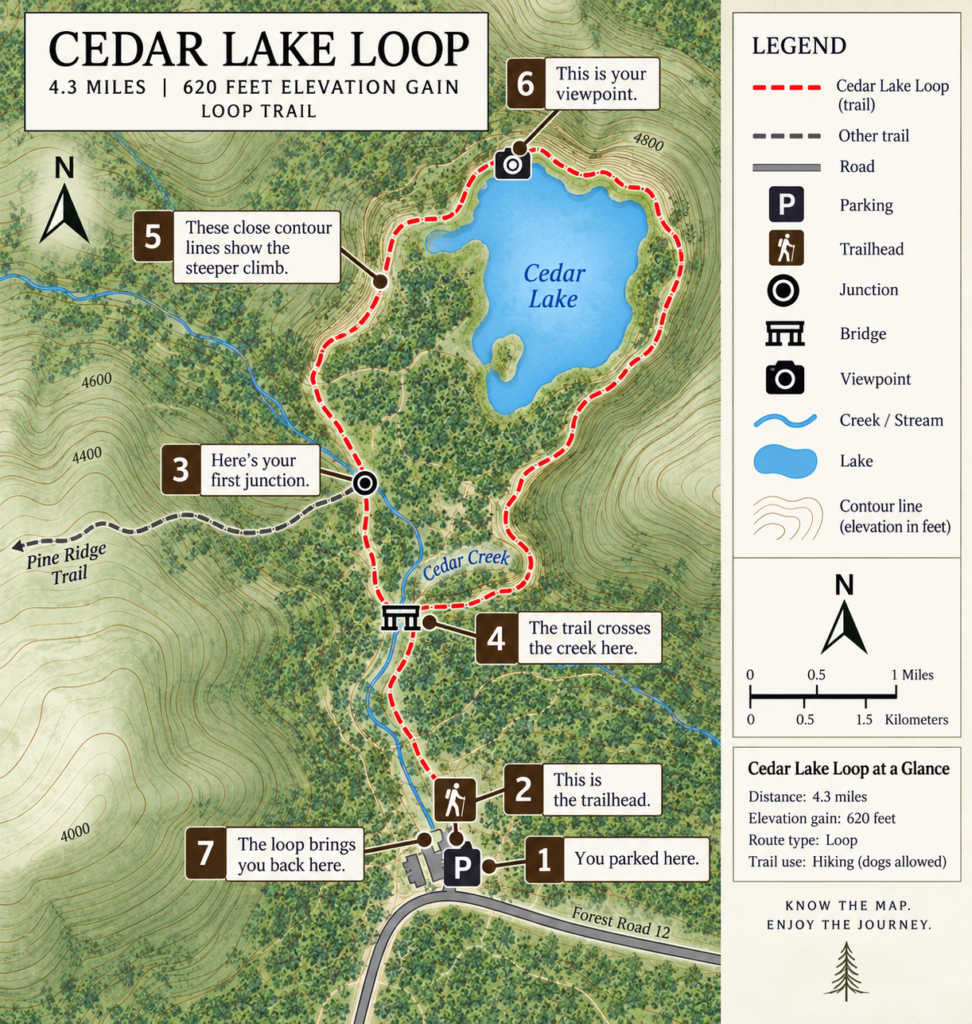
Follow the Trail: Signs, Markers and Junctions
Once you start walking, navigation usually becomes much simpler than it looked from home. You do not need to spend the entire hike staring at a map or wondering whether every bend in the trail is a decision point. Most of the time, you walk the trail in front of you.
What matters is recognizing the moments when you do need to make a decision.
Trail Signs
Trail signs are the most straightforward form of navigation you’ll encounter. They may show a trail name or number, point toward destinations, identify connecting trails or give distances to landmarks and junctions.
When you reach one, don’t just glance at the arrow and keep moving. Take a second to compare the sign with the route you planned. If Cedar Lake is supposed to be to the left at this junction and the sign says Cedar Lake left, you have confirmation that the map and the trail in front of you still agree.
That confirmation is useful even when the choice seems obvious.
Trail Markers and Blazes
Not every trail is marked with large signs. Depending on where you’re hiking, a route may be identified by blazes—painted marks on trees or rocks—or by posts, symbols, colored markers, cairns or small trail emblems.
There is no single marking system used everywhere, so don’t assume a particular color or symbol has the same meaning on every trail. Find out how this trail is marked and then watch for those markers as you walk.
Markers are reassurance that you’re continuing along the intended route. If you’ve been seeing them regularly and suddenly haven’t seen one for a long time, that is worth noticing.
Junctions Are Where You Slow Down
A junction is simply a place where trails meet or split. This is where you want to become deliberate again.
Stop long enough to identify the choices in front of you. Look for signs or markers. Check your map. Make sure the trail you intend to follow actually leaves the junction in the direction you think it does.
Then do something beginners often forget:
Look behind you.
Notice what this junction will look like when you’re coming from the opposite direction. The obvious left turn you just made may become a much less obvious right turn several hours later. Take a photograph if the junction is complicated or poorly marked.
Don’t Let Other Hikers Navigate for You
Seeing several people walk confidently down one branch of a trail can make that direction feel automatically correct.
It isn’t.
They may be hiking a different route, heading toward another destination, returning to a different trailhead or simply making a mistake themselves. Friendly information from another hiker can be helpful, but your route should still agree with your map, signs and markers.
Follow your trail, not the crowd.
If the Trail and Your Map Stop Agreeing, Stop
If you expected a junction and never reached it, your location on the map doesn’t make sense, the trail seems to be heading in the wrong direction or you suddenly realize you haven’t seen the expected markers for quite a while, don’t keep walking simply because continuing feels easier than admitting you’re uncertain.
Stop and figure out where you are.
Look at your map. Think about the last place where you were certain of your location. Check the signs or markers around you. If necessary and safe to do so, return to that last known point and reassess from there.
A small navigation question is much easier to solve before you turn it into several more miles of walking.
You don’t need to know exactly where you are every second of the hike. You need to recognize the places where choices happen, confirm those choices against the information you brought with you and notice when something no longer makes sense.
Most of the time, the trail will simply be the trail.
At the moments when it isn’t obvious, that’s when you stop and check.
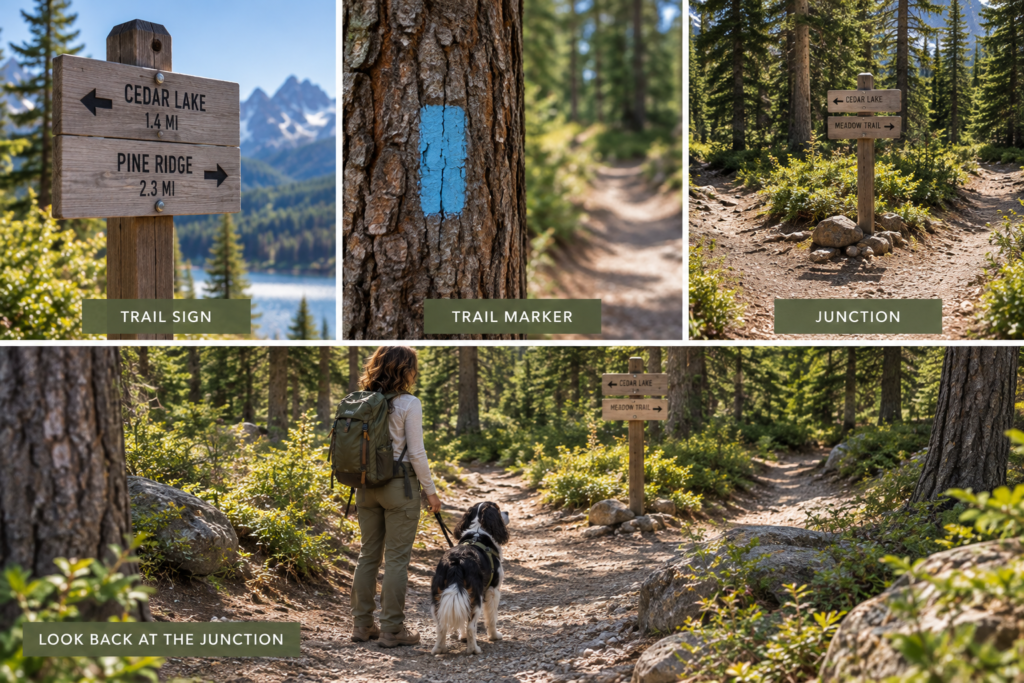
Make Sure You Can Find Your Way Back
Finding the correct trail is only half of navigation. You also need to know how you’re getting back to where you started.
On Cedar Lake Loop, that’s relatively simple because the route eventually circles back toward the trailhead. But even on a loop, you’ll encounter junctions and connecting trails along the way. On an out-and-back route, you’ll retrace the same trail in the opposite direction. On a point-to-point trail, your finish is somewhere entirely different. Knowing your route type before you begin tells you what “getting back” is supposed to look like.
Keep Your Map Available
The map you downloaded before leaving home shouldn’t disappear into your phone until there’s a problem. Check it occasionally as you walk, particularly at junctions or after passing major landmarks.
You don’t need to constantly track the little location dot on your screen. Instead, use the landscape to keep a general sense of your progress. You crossed the bridge. You passed the junction. You reached the lake. Those recognizable features help you connect where you’ve been with where you are on the map.
And because you saved the map for offline use, losing cell service doesn’t mean losing access to it.
Remember Your Junctions
Remember our habit from the last section: when you make a turn at a junction, look back.
That becomes particularly valuable on the return. A side trail that was obvious when you approached from one direction can look surprisingly convincing when you’re coming from another.
If a junction is confusing, take a photograph when you first encounter it. You aren’t collecting pretty trail pictures; you’re giving your future self a reference for what the correct return route looks like.
Know the Name or Number You’re Following
If your route follows a named or numbered trail, know what it is.
That gives you something concrete to compare with signs along the way. “I need to follow Cedar Creek Trail back toward the trailhead” is considerably more useful than “I think we came from over there.”
The same applies if your route uses several trails. You don’t necessarily need to memorize all of them, but have that information available on your saved map or route description.
Save Your Parking Location
If your phone or mapping app allows it, save the location of your parked car before you begin. This is particularly useful when the parking area is large, roadside, spread across several lots or connected to multiple trailheads.
It isn’t a substitute for knowing your route. It’s simply another useful piece of information.
Don’t Count on Cell Service
Remote and mountainous areas frequently have limited or nonexistent service. Plan as though the bars on your phone may disappear.
That’s why the work you did earlier matters: the trail map is downloaded, important directions are saved, your route is understood and someone knows where you’re going.
Your phone can still be extremely useful without a cellular connection. What you don’t want is for the information you need to exist only somewhere on the internet you can no longer reach.
If You’re Unsure, Deal With It Early
If something stops making sense on the return, don’t continue walking simply because the parking lot must be “somewhere that way.”
Stop. Check your map. Look for the trail name or markers. Think about the last junction or landmark you confidently recognized.
If necessary and safe, return to the last place where you knew exactly where you were and reassess from there.
The goal isn’t to walk through the woods with perfect awareness of your coordinates at every moment. It’s much simpler than that.
Know what route you’re following. Notice the important decisions you make along the way. Keep the information you need available offline. And when something doesn’t make sense, stop and figure it out before continuing.
That is enough to make finding your way back part of the plan instead of something you only think about once you’re already trying to do it.
What If You Get There and It Doesn’t Feel Right?
Sometimes you can do everything right at home and still arrive to find something you weren’t expecting.
The road may be rougher than the description suggested. The parking area may feel uncomfortable. The weather may have changed faster than forecast. The trail entrance may be poorly marked, or you may stand in front of three different paths and realize you cannot confidently determine which one you’re supposed to take.
Or perhaps nothing is technically wrong. You simply look at the trail in front of you and think, I don’t feel good about this.
You are allowed to leave.
New Information Changes the Plan
Planning a hike means making the best decision you can with the information available beforehand. Arriving gives you new information.
If the actual conditions don’t match what you researched, reassess.
A trail rated moderate may look considerably more difficult than you expected. A creek crossing may be higher than recent reports suggested. Snow or mud may remain on the trail. Smoke may have moved into the area. A road or gate may be closed. You may discover that the parking situation, terrain or weather simply isn’t something you’re comfortable dealing with today.
None of that means you planned badly. It means the information changed.
Your plan can change with it.
You Don’t Have to Justify Turning Around
This applies after you’ve started walking too.
You don’t need an emergency to turn around. You don’t need to reach the lake because you drove all this way. You don’t need to keep going because everyone else appears perfectly comfortable. You don’t need to prove that the trail really is “moderate.”
If you’re more tired than expected, the terrain feels beyond your ability, the weather is deteriorating, you’re losing daylight, you’re uncertain about the route or something simply doesn’t feel right, turning around is an available decision.
And if you’re hiking with other people, remember the filter we added at the very beginning of this guide: the outing needs to work for the least experienced person in the group too. A route doesn’t become appropriate for someone simply because everyone else can handle it.
Uncertainty Is Information
There is a difference between being nervous because something is new and realizing you don’t have enough information to continue confidently. You don’t have to eliminate every flicker of uncertainty before hiking somewhere unfamiliar, but you should pay attention when you cannot answer an important question.
If you can’t identify the correct trail, don’t guess.
If you can’t tell whether a crossing is safe, don’t assume.
If conditions are substantially different from what you prepared for, don’t force the original plan simply because it was the plan.
Go back to the last place where things made sense, reassess and decide from there.
Sometimes that decision will be to continue.
Sometimes it will be to turn around.
Sometimes it will be to get back in the car, find somewhere else to walk and save Cedar Lake for another day.
All three are legitimate outcomes.
Finding a trail does not create an obligation to hike it. Starting a trail does not create an obligation to finish it.
The goal was never to prove that you could complete the plan. The goal was to learn enough to make good decisions once the plan met the real world.
Your First-Trail Checklist
By now, finding a trail probably looks very different from the vague process it may have seemed like when we started. You don’t need to know everything about hiking before choosing somewhere to go. You need a repeatable way to ask the right questions.
Before choosing a trail, check the distance, elevation gain, route type, difficulty and terrain, and make sure the trail works for everyone who will be hiking with you. If you’re bringing a dog, confirm that dogs are actually permitted and learn the applicable leash rules. Read the description instead of relying only on the difficulty rating, and look at recent conditions when they’re available.
Once you’ve chosen the trail, figure out exactly where you’re driving. Identify the park or land area, the correct trailhead and the parking location. Check the road and access information, parking rules, fees, permits or passes, closures and anything else that could affect whether you can actually reach the trail.
Before you leave home, check the weather and current conditions again. Know approximately how much daylight you’ll have, charge your phone, pack what you need and save your trail map and important information for offline use. Tell someone where you’re going and when you expect to return. If conditions have changed enough that the original plan no longer makes sense, choose another plan.
When you arrive, confirm that you’re at the correct trailhead. Read the kiosk and current notices, locate the actual beginning of your route and orient yourself using the map. Notice where you parked and what the trailhead looks like from the direction you’ll see it when you return.
Once you’re walking, you don’t have to obsess over navigation. Pay attention when the trail gives you a decision to make. Read signs and markers, slow down at junctions, compare what you’re seeing with your map and look behind you after making turns so you’ll recognize the route from the opposite direction. Keep a general sense of the landmarks you’ve passed and where they place you along the route.
Most importantly, remember that every part of this process is information, not an obligation. If the road, weather, terrain, trail conditions or anything else you encounter doesn’t match what you prepared for, reassess. You can choose another trail. You can turn around. You can come back another day.
The first few times you do all of this, it may feel like a lot of steps. It won’t always. Eventually you’ll check distance, elevation, access, parking, weather and a map almost automatically. You’ll arrive at an unfamiliar trailhead and know what to look for because you’ve done it before.
That’s how unfamiliar becomes familiar.
And to make those first few trips easier, we’ve put the whole process into one checklist you can save and take with you.
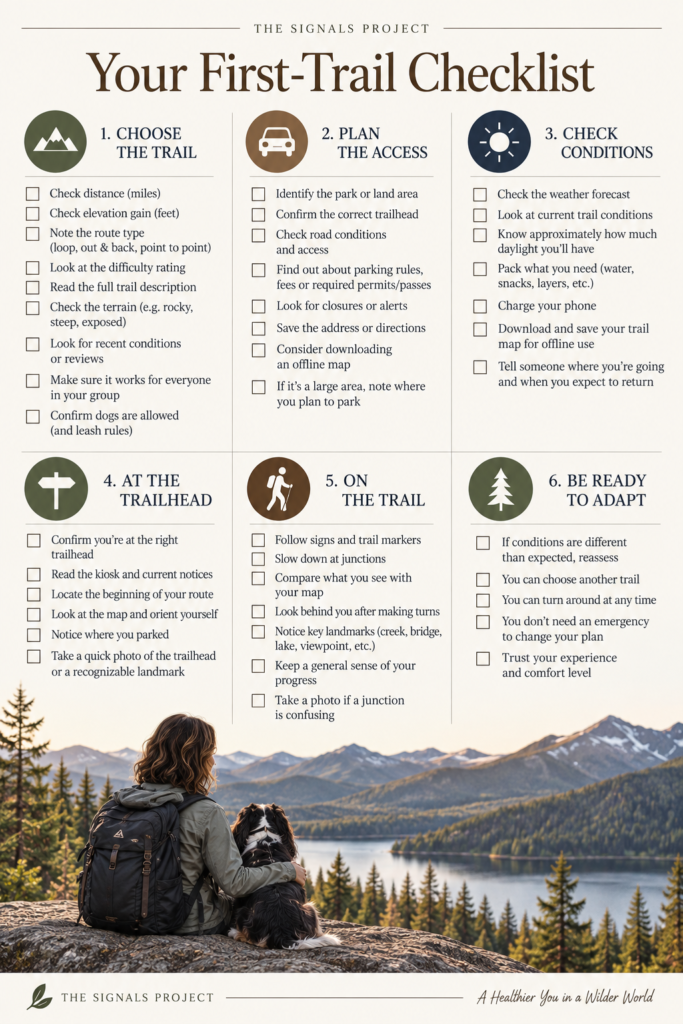
Now Go Find Your Trail
At the beginning of this guide, finding a trail may have felt like something you were somehow already supposed to know how to do. Someone says, “We should go hiking,” and suddenly there are trail names, parks, mileage numbers, elevation profiles, difficulty ratings, permits, parking lots, maps and roads you’ve never heard of. Everyone else seems to know what those things mean and where they’re supposed to go next.
Now you do too.
You know how to start with the kind of day you actually want and narrow the possibilities from there. You know that mileage doesn’t tell the whole story, that elevation gain matters, that “moderate” is only useful when you understand what made someone call a trail moderate, and that the right trail is the one that works for the people who are actually going to hike it. You know how to look beyond the pretty photograph and figure out where the trail is, where the trailhead is, where you’ll park and whether you can actually get there.
You know how to read the information in a trail listing instead of letting it overwhelm you. You can look at a basic map and find the route, the junctions, the landmarks and the shape of the terrain. When you arrive, you know to orient yourself before you start walking. On the trail, you know when to pay attention, when to check the map and why looking behind you at a junction can matter later.
Most importantly, you know that none of this is about executing a perfect plan. Conditions change. Weather changes. Roads close. Trails look different in person than they did on a screen. Sometimes you arrive and decide to go. Sometimes you turn around halfway through. Sometimes you look at the trailhead, look at Oreo, look back at the car and say, “Nope. Not today.”
That’s part of knowing what you’re doing too.
The next trail you choose will probably still be unfamiliar. That’s the point. But unfamiliar doesn’t have to mean intimidating anymore. You have a way to figure it out: one question, one piece of information and one decision at a time.
You don’t need someone else to hand you the name of a trail and tell you exactly where to go.
You know how to find one now.
Sources
National Park Service — Ten Essentials
Trip preparation, navigation, water, emergency supplies and telling someone where you’re going.
National Park Service: Ten Essentials
National Park Service — Hike Smart
Planning for a hike, researching the route and terrain, water and food, appropriate equipment and basic hiking preparation.
National Park Service: Hike Smart
National Park Service — Hiking With Pets
Checking whether dogs are permitted, choosing an appropriate trail for your dog, leash practices, water and preparation for hiking with a pet.
National Park Service: Hiking With Pets
U.S. Geological Survey — What Is a Topographic Map?
How topographic maps represent terrain and elevation using contour lines.
U.S. Geological Survey: What Is a Topographic Map?
U.S. Geological Survey — US Topo Map Symbol Guide
Map symbols, contour lines, contour intervals and interpreting closely versus widely spaced contour lines to understand slope.
U.S. Geological Survey: US Topo Map Symbol Guide
Leave No Trace — Plan Ahead and Prepare
Checking regulations, preparing for weather and hazards, trip planning and carrying appropriate navigation tools.
Leave No Trace: Plan Ahead and Prepare
National Park Service — NPS App: Offline Use
Using downloaded park information and maps when cellular service is unavailable.
National Park Service: NPS App — Offline Use